
How AI Memory & Context Works in MemoryX — Save, Extract, Recall
A question we hear a lot: how does MemoryX actually implement cross-platform AI memory? How are memories extracted from conversations? And how are they automatically injected the next time you ask a question?
This post is not a theoretical discussion. It is a technical deep-dive based on our actual codebase. Every detail described here has a corresponding implementation. (Read the backstory: Why I Built MemoryX.)
Architecture Overview: Capture → Structure → Recall
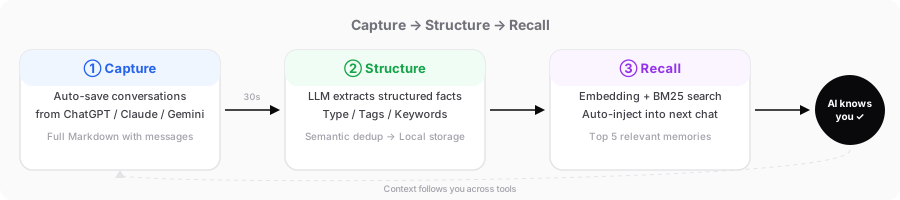
The MemoryX memory system works in three steps:
- Capture: Automatically save your conversations on ChatGPT, Claude, and Gemini
- Structure: Use an LLM to extract structured memories from conversations, deduplicate, and store them
- Recall: When you ask your next question, automatically search for relevant memories and inject them into the conversation context
These three steps form a complete closed loop. Something you discussed in Claude can be automatically recalled the next time you ask a question in ChatGPT.
Step 1: Save Conversations
The MemoryX Chrome extension automatically monitors your conversations on AI platforms, checking for content changes every few seconds and saving them as complete conversation records.
There are two saving modes:
- Auto-save: Triggers every 1.5-5 seconds, incrementally saving whenever new messages are detected
- Manual save: The user clicks the save button explicitly
What gets saved is the full conversation in Markdown, including both user messages and AI responses. This is the foundation for everything that follows.
Step 2: Extract Memories from Conversations
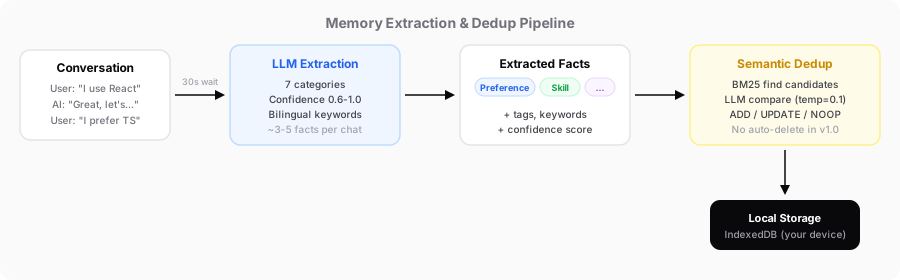
After saving a conversation, MemoryX uses an LLM to extract structured memories from it. This is the most critical part of the entire system.
What to Extract, What to Skip
We defined 7 extraction categories:
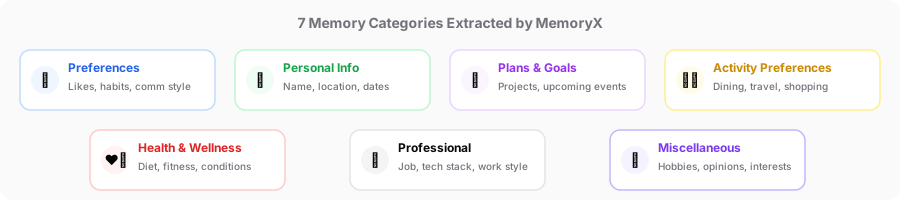
- Personal preferences: Likes, habits, communication style
- Important personal information: Name, location, key dates
- Plans and intentions: Goals, projects, upcoming events
- Activity and service preferences: Dining, travel, shopping habits
- Health information: Dietary restrictions, fitness routines
- Career information: Job title, tech stack, work style
- Other: Interests, opinions, attitudes
Equally important is what not to extract. This is where we spent a significant amount of time fine-tuning. It comes down to two core criteria:
Distinguish lasting preferences from one-off instructions. Only extract information that reflects who the user is. For example, "prefers minimalist design" is a lasting preference and should be extracted. But "translate this paragraph for me" is a one-time request and should not. A simple test: if this piece of information would not help another AI understand the user better, it should not be extracted.
Distinguish the user's own information from referenced content. When the user shares a link, quotes an article, or pastes example code, the referenced content should not be extracted as facts about the user.
Extraction Output Format
Each extracted memory is structured, containing type, text, tags, bilingual keywords, and a confidence score:
{
  "type": "preference",
  "text": "Prefers coding in TypeScript",
  "tags": ["TypeScript", "programming language"],
  "keywords": ["TypeScript", "TS", "programming", "编程"],
  "confidence": 0.9
}
A few key design decisions:
- type is one of four categories:
skill,preference,objective, orcontext - Keywords are bilingual (both English and Chinese), so relevant memories can be found regardless of what language the user types in
- confidence scores indicate certainty -- explicitly stated information gets high confidence, reasonable inferences get moderate confidence
- Memory text matches the user's language: if the user chats in English, the extracted memory will be in English
Reasonable Inference
Our system allows reasonable inference. If a user is asking about React hooks, we infer they use React and extract that at moderate confidence. This is inspired by mem0's design philosophy -- extract broadly, but tag confidence levels, so the recall stage can sort and filter accordingly.
Merge, Don't Fragment
We explicitly instruct the LLM to merge related information into a single, complete memory rather than splitting it into fragments. For example, if a user discusses logo design and mentions style, colors, letters, and references, that should be one memory, not four.
The goal is 3-5 high-quality memories per conversation, not 10+ fragments.
Incremental Extraction
If the same conversation continues, we do not re-extract from the beginning every time. The system tracks "last extracted up to message N" and only processes new messages:
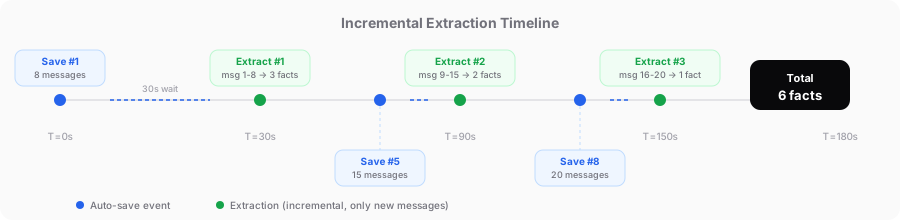
Already-processed messages are passed to the LLM as background context, but the LLM only extracts from new messages, avoiding duplicates.
Auto vs. Manual Extraction
Auto-extraction uses standard confidence thresholds. When the user manually clicks the "Extract Memory" button, the system becomes more aggressive -- lowering thresholds, broadening the extraction scope, and mining as much valuable information as possible from the conversation. A manual trigger signals that the user considers this conversation valuable, and the system should honor that intent.
30-Second Stability Window
Extraction does not trigger in real-time. After the last new message, the system waits 30 seconds. If another message arrives within those 30 seconds, the timer resets. This prevents frequent extraction while a conversation is actively ongoing:
T=0s   New message → Schedule extraction in 30s
T=3s   New message → Cancel previous, reschedule in 30s
T=8s   New message → Cancel previous, reschedule in 30s
T=38s  30s of silence → Extract all new messages from T=0~8s
Step 3: Semantic Deduplication
After memories are extracted, there is one more gate before storage: semantic deduplication. This prevents duplicate memories from being saved.
Candidate Search
First, BM25 keyword search finds existing memories that might be duplicates, narrowing down the candidate set.
LLM Decision
Then the LLM compares each new memory against the candidates and makes one of four decisions:
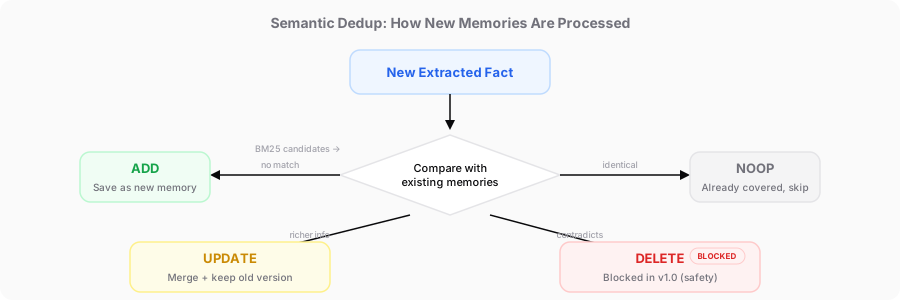
To ensure consistent judgments, the LLM uses a very low temperature parameter in this step, minimizing randomness.
Safety Policy
One important design principle: AI cannot automatically delete a user's memories. In v1.0, even if the LLM determines a DELETE is appropriate, we opt for a more conservative approach. UPDATE operations preserve the old text (old_text), so changes can be reverted if something goes wrong.
| Action | Behavior | Safety |
|---|---|---|
| ADD | Save directly | No risk |
| UPDATE | Update content + preserve old version | Reversible |
| DELETE | No auto-deletion in v1.0 | Zero risk |
| NOOP | No action taken | No risk |
Step 4: Auto-Recall
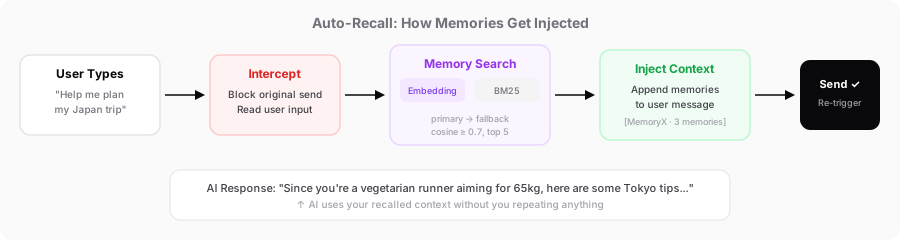
Once saving and extraction are done, memories sit quietly in storage. What truly makes them valuable is recall -- automatically injecting relevant memories into the conversation context the next time you ask a question.
Embedding Search + BM25 Fallback
When the user types a message and hits send on an AI platform, MemoryX intercepts the send action and performs a memory search first.
The core search logic is embedding vector search first, BM25 keyword search as fallback.
Embedding search converts both the user's input and all stored memories into high-dimensional vectors, then ranks them by cosine similarity to find the most semantically relevant memories. We set a similarity threshold so only truly relevant results are returned.
The advantage of embedding search is semantic understanding:
- BM25: "likes minimalist design" vs. "pursues clean aesthetics" → No match (no shared keywords)
- Embedding: "likes minimalist design" vs. "pursues clean aesthetics" → Match (semantically close)
Search results also go through a round of result deduplication -- if two results are highly similar semantically, only the higher-scoring one is kept, preventing redundant information from being injected.
BM25 search serves as the fallback. When the Embedding API is unavailable (network errors, etc.), the system automatically switches to local keyword search. While less precise, it ensures the system remains functional under offline or error conditions.
Intercept and Inject
After the memory search completes, MemoryX appends the results to the end of the user's message. This process is transparent to the user.
Technically, we intercept the user's send event during the DOM capture phase -- this ensures MemoryX can intervene before frameworks like React process the event.
The interception flow:
- User presses Enter or clicks the send button
- MemoryX blocks the original send event
- Reads the user's input → sends it to the service worker for memory search
- Relevant memories found → appended to the end of the user's message
- Re-triggers the send (preferring the send button click, which is more reliable)
The injected format looks like this:
---
[MemoryX Context · 3 memories]
- [preference·Mar] Prefers coding in TypeScript
- [skill·Feb] Uses Claude Code and Cursor as development tools
- [objective·Mar] Currently developing a Chrome extension project
(Above is user background info. Answer the question directly; refer to context only when relevant.)
---
Each memory includes a type label and a time annotation. Type labels automatically switch between English and Chinese based on the user's input language. To avoid overly long context, the system caps the number of injected memories, keeping only the most relevant ones.
Usage Statistics
Every time a memory is recalled and used, the system asynchronously updates usage statistics (usageCount and lastUsedAt) in the background, without blocking the user's send flow. This data can be used in the future to optimize recall ranking and identify memories that are no longer relevant.
Step 5: Conversation Summary
Beyond extracting structured memories, MemoryX also supports generating conversation summaries. The purpose of summaries is to help users quickly resume a prior conversation in a different AI tool.
The summary system automatically detects the primary language of the conversation and generates the summary in the matching language -- Chinese conversations produce Chinese summaries, English conversations produce English summaries.
The summary structure is standardized, designed for handoff:
- User / Background: Inferred user identity and current situation
- Project / Topic: One-line summary of the core issue
- Current Status: Where the conversation left off and what conclusions were reached
- Key Information: Facts, decisions, and plans organized by topic
- Open Items: Unresolved questions
- Continuation Point: Where the next AI can pick up
This is not a generic "conversation summary." It is a handoff document -- when you switch from ChatGPT to Claude, Claude can understand the full context in seconds.
Key Differences from Alternatives
After researching mem0 (the 24K-star open-source benchmark), Letta/MemGPT, Zep / Graphiti, and others, we made several differentiated choices:
| Dimension | mem0 | MemoryX |
|---|---|---|
| Extraction timing | Immediate, per message | Batch extraction after 30s of stability |
| LLM calls | 1 extraction + 1 check per fact | Extraction + check combined into 1 call |
| Auto-delete | Supported | Disabled (conservative v1.0 policy) |
| Update protection | None | Preserves old_text for rollback |
| Embedding failure | No fallback | Automatic BM25 fallback |
The guiding principle: be conservative with memory safety, aggressive with extraction quality, and always have a fallback for reliability.
Conclusion
The MemoryX memory system is not a simple "save and search." It is a complete pipeline:
Capture conversation → 30s stability window → Incremental extraction → Semantic dedup → Vector + keyword search → Auto-inject
Every step has a clear design rationale, and every step has a corresponding fallback strategy. We do not aim to be optimal at each individual step, but we ensure the entire pipeline runs reliably under all edge cases.
This is how we actually built it -- not theory.
Try It Out
If you switch between multiple AI platforms and want all of them to "remember you," give MemoryX a try.
- Install the Chrome extension: Chrome Web Store
- Join our Discord community to share your use cases and feedback: discord.gg/5Bfd7ryKFM
Ready to try MemoryX?
Stop repeating yourself across AI tools. Let your context follow you.
Install from Chrome Web Store