
ChatGPT vs Claude vs Gemini: AI Memory & Context Features Compared (2026)
In 2026, all three major AI platforms — ChatGPT, Claude, and Gemini — have shipped their own AI memory features. ChatGPT Memory, Claude Memory, and Gemini Memory each try to make AI "remember" your personal context across conversations.
But as someone who uses all three tools heavily every day, I've found that their implementations, capabilities, and user experiences differ dramatically. This article is a deep comparison based on real-world usage — not a rewrite of official docs, but first-hand observations from daily use.
I'll analyze each platform's AI memory features across five dimensions: how memories are extracted, how past conversations are referenced, how memories are presented, cross-platform memory import capabilities, and key limitations.
Quick Comparison: ChatGPT Memory vs Claude Memory vs Gemini Memory
| Dimension | ChatGPT Memory | Claude Memory | Gemini Memory |
|---|---|---|---|
| Feature name | Memory | Memory | Memory (formerly Saved Info / Personal Context) |
| Auto-extraction | Automatic | Automatic (every 24h) | Automatic |
| Manual add | Yes ("remember xxx") | No (manual editing only) | Can correct in chat |
| Capacity | Saved Memories capped, Chat History unlimited | Limited | Limited |
| User editable | View, delete, search, sort | View, edit, delete | View, delete |
| Cross-platform import | Not supported | Supported (memory import) | Supported (memory import + ZIP chat history) |
| Memory transparency | Medium | Relatively high | Low |
| Memory structure | Unstructured text entries | Structured narrative categories | Brief entries |
| Past conversation reference | Reference Chat History | Chat Search (RAG) | Past Chats |
| Memory display | Plain text list | Segmented narrative (4 categories) | Brief entries |
| Management location | Settings → Personalization | Settings → Capabilities | Settings → Personal Intelligence |
| Paywall | Saved Memories + Chat History: Plus/Pro only | Chat Search: paid users only | Google AI plan users prioritized |
| Privacy note | Optionally used for model training | Not used for training | Imported data used for training |
ChatGPT Memory: AI Memory Management & Saving Conversations
ChatGPT was the first platform to launch an AI memory feature. It went through a quiet period with few updates and sluggish fact maintenance, but has recently started iterating rapidly again.
Related docs:
- What is Memory?
- Memory vs Custom Instructions — Custom Instructions are for explicit directives and preference settings; Memory records information shared during conversations
- How does Reference saved memories work?
- Memory FAQ
How Memory is Extracted
ChatGPT's AI memory extraction uses a dual auto + manual mode — its most distinctive advantage among the three platforms.
Automatic extraction: ChatGPT automatically determines which information is worth remembering during conversations. When it decides to save a memory, it shows a notification telling you what it remembered. But honestly, the extraction logic isn't transparent to users — you're never quite sure why it chose to remember certain things while ignoring others.
Manual addition: You can directly tell ChatGPT "remember xxx" and it will write that information into memory. This seems simple but is incredibly useful in practice. For example, I'd say "Remember that I am vegetarian when you recommend recipes" and it dutifully saves it. You can also ask "What do you remember about me?" at any time to review current memories. Claude doesn't support this manual approach.
My experience is that ChatGPT's auto-extraction sometimes remembers unimportant things (like a tool name I mentioned in passing) while overlooking more important preferences. Fortunately, manual mode compensates for this gap.
How Past Conversations Save AI Context
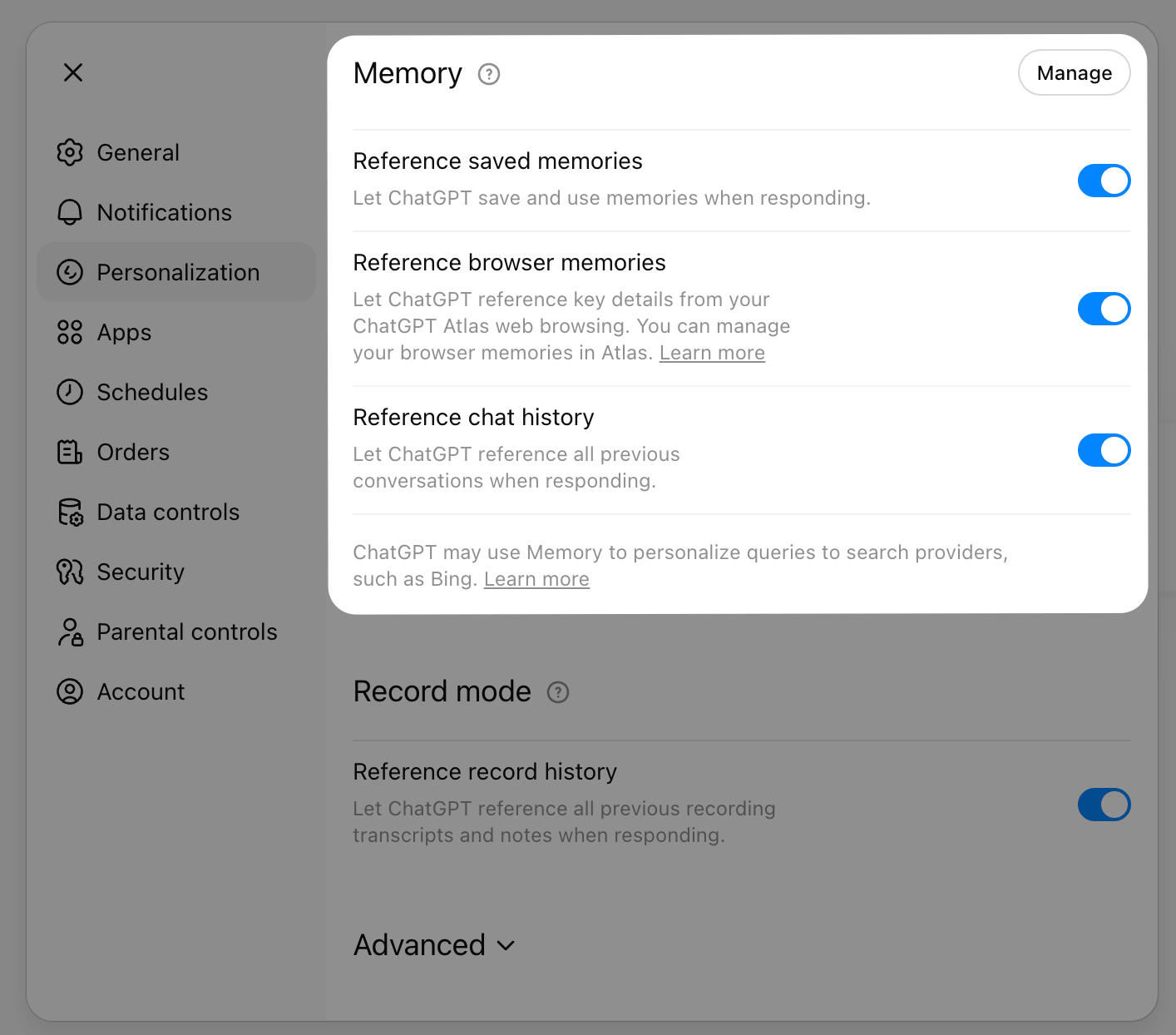
ChatGPT's memory system actually comprises two independent features: Reference Saved Memories and Reference Chat History. Both can be toggled independently in Settings → Personalization.
According to a security researcher's deep analysis, ChatGPT's system prompt contains six memory-related sections: saved memory entries (with timestamps), auto-inferred user preferences (with confidence scores), historical conversation topic summaries, user profile information, summaries of roughly the last 40 conversations, and user interaction metadata.
Per the official docs, with Reference Chat History enabled, ChatGPT references past conversations to understand your interests and preferences. Unlike Saved Memories, Chat History details evolve over time — ChatGPT automatically updates what it considers most useful. The official recommendation: Chat History has no storage limit, but since it won't remember every detail, use Saved Memories for information you want ChatGPT to always retain.
Notably, ChatGPT's Reference Chat History isn't on-demand search like Claude's Chat Search — it's more like an automatically aggregated user profile. Disabling Reference Saved Memories also disables Reference Chat History, but you can disable Chat History independently. After disabling Chat History, information ChatGPT remembered from past conversations is deleted from the system within 30 days.
How ChatGPT Memory is Presented
ChatGPT presents memories as a plain text list of entries, each a brief description. You can view and manage all memories in Settings → Personalization → Memory.
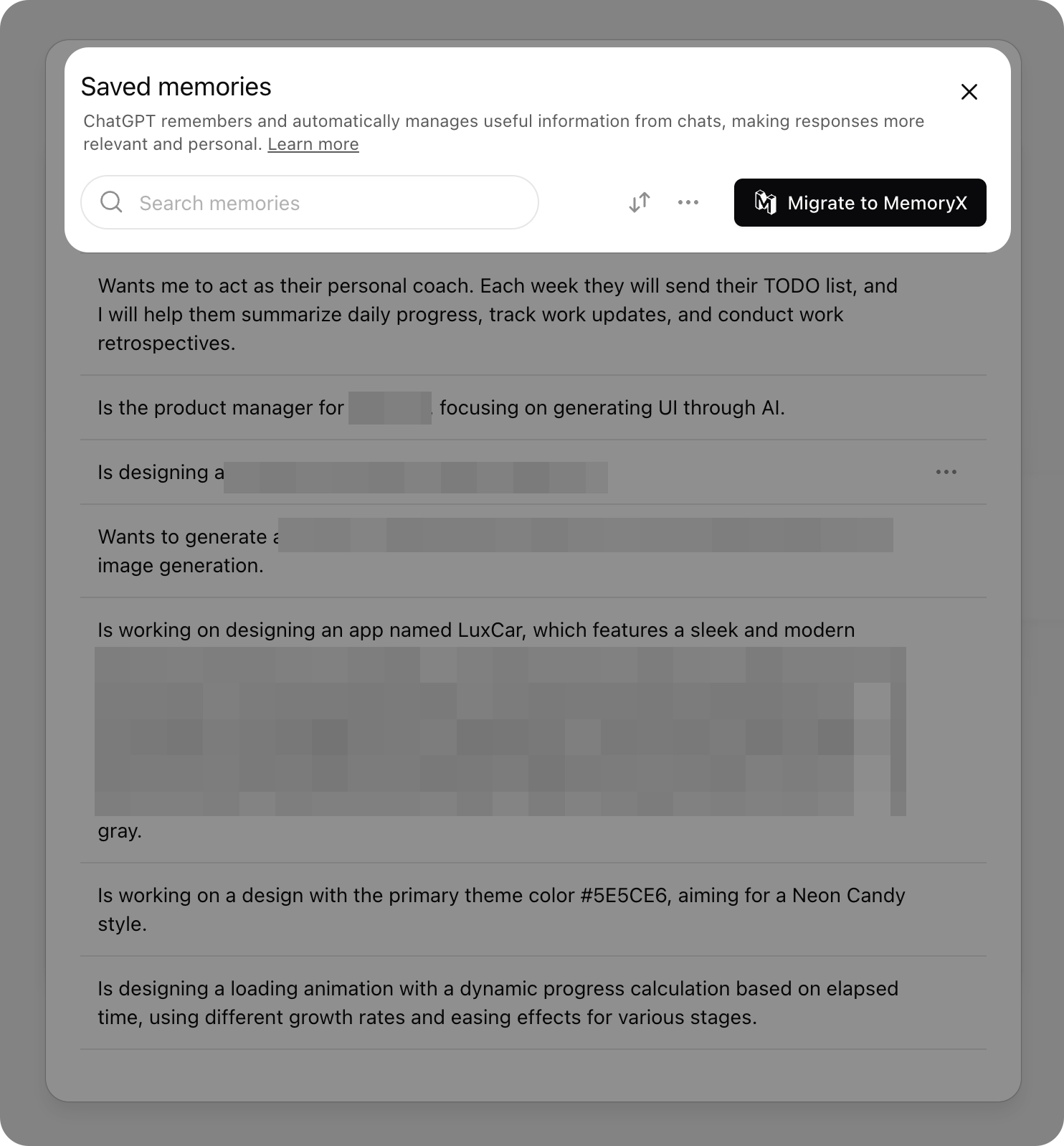
Typical memory entries look like:
"Is the product manager for [Company], focusing on generating UI through AI."
"Wants to generate a [feature description]."
"Prefers TypeScript over JavaScript."
Per official docs, memory entries are meant for high-level preferences and details — they shouldn't be used to store precise templates or large verbatim text blocks.
Plus and Pro users can now use automatic memory management, letting ChatGPT prioritize the most relevant memories and push less important ones to the background. You can also search memories, sort by time, view memory version history, and restore previous versions. But overall, compared to Claude's structured narrative approach, ChatGPT's entry-based memory management still gets messy at scale.
Note: Saved Memories and Chat History features are Plus/Pro only. Free users can only use Saved Memories.
Cross-Platform Memory Import
ChatGPT currently does not support importing memories from other AI platforms. If you want to bring memories from Claude or Gemini into ChatGPT, you'll need to manually copy-paste or tell it "remember xxx" one entry at a time.
ChatGPT Memory: Key Limitations
- Opaque extraction logic — You can't tell why it remembered some things and ignored others
- Unstructured memory format — Plain text entries with no categories, tags, or time dimensions
- Memory management improving but still limited — Plus/Pro users can now search and sort, but still can't export
- Memory locked inside ChatGPT — Cannot be transferred to other AI platforms
- Stale memories linger — Outdated information sometimes persists, affecting response quality
- Deleting chats doesn't delete memories — Official docs explicitly state "Deleting a chat doesn't erase its memories" — you must manually delete them from the memory management page
- Privacy considerations — ChatGPT uses memories to optimize search queries. For example, if your memories include "lives in Beijing" and "vegetarian," asking "what's good to eat nearby?" might cause ChatGPT to rewrite the search as "vegetarian restaurants in Beijing." If "Improve the model for everyone" is enabled, your conversations and memories may be used for model training
Claude Memory: Structured AI Memory & Personal Context Management
Claude's AI memory feature is relatively new but iterating fast. Among the three platforms, Claude Memory leads in structured organization and cross-platform memory import experience.
Related docs:
How Memory is Extracted
Claude's AI memory extraction is purely automatic. According to the official docs, Claude's memory system automatically synthesizes conversations into a knowledge base, updated every 24 hours. Each Project has its own memory space, separate from non-Project conversation memories.
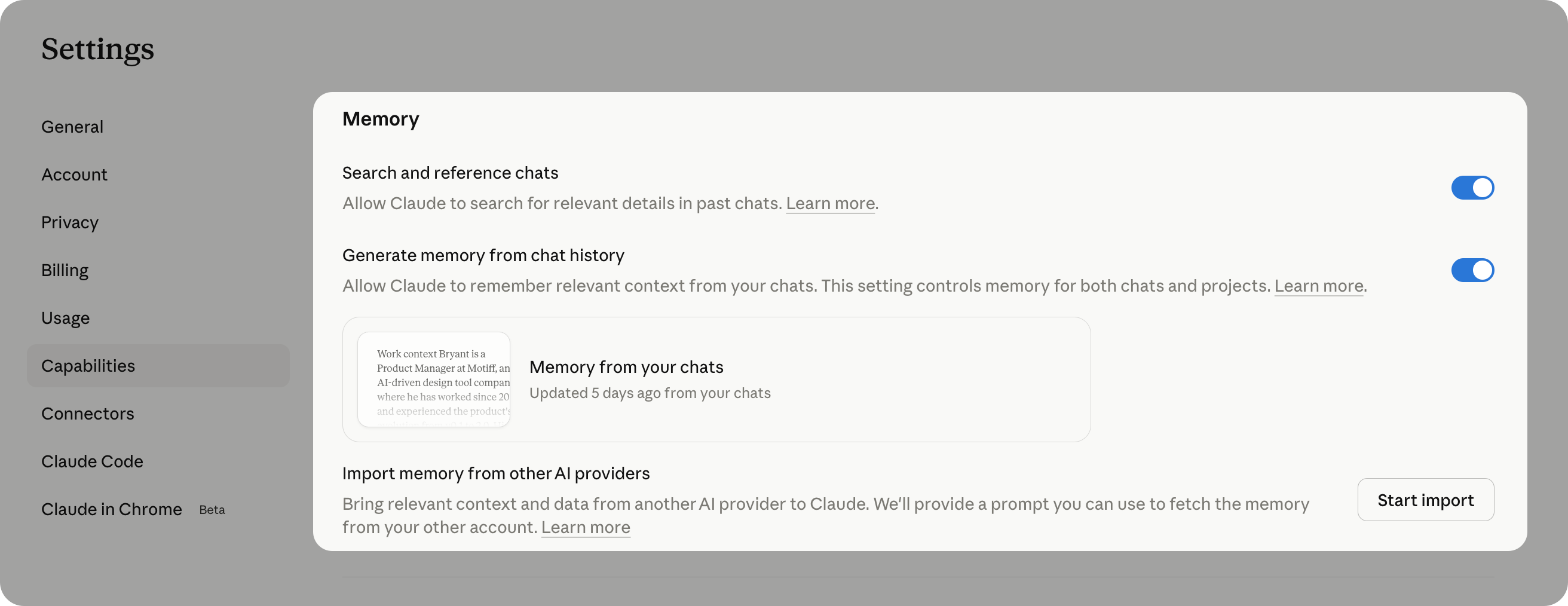
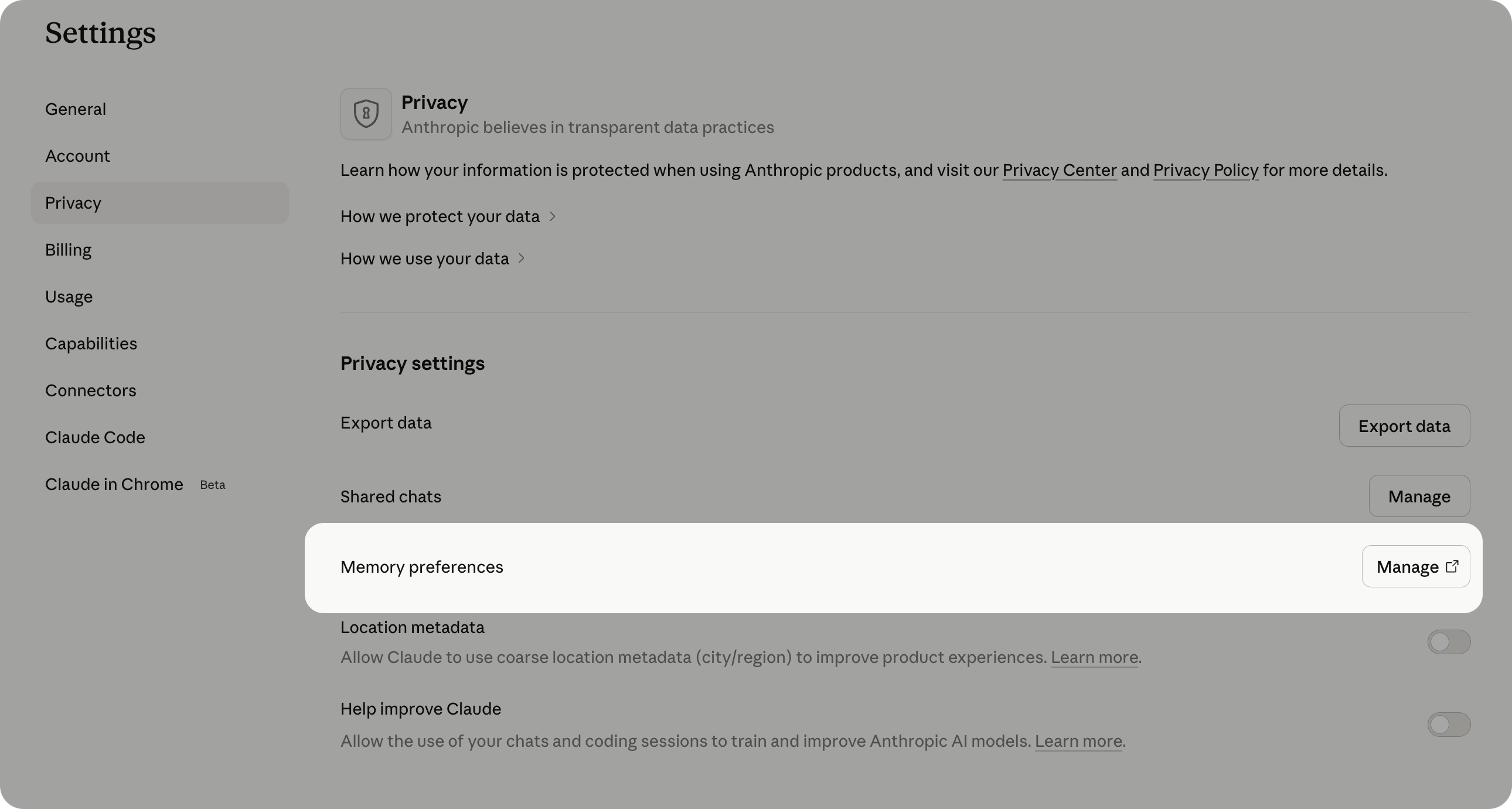
Unlike ChatGPT, Claude doesn't support manually adding memories — you can't say "remember xxx" to force-write a memory entry. However, you can edit memory content through Settings → Capabilities → "Tell Claude what to remember or forget."
My experience is that Claude's auto-extraction is more "restrained" than ChatGPT's. It doesn't remember too many trivial things, but that also means some information you consider important might not get automatically captured. It's a deliberate trade-off — better to under-remember than to remember noise.
When Claude uses memories in conversation, it typically provides transparency cues letting you know it's referencing previously learned personal context.
How Claude References Past Conversations
Claude supports Chat Search (Pro, Max, Team, and Enterprise paid users only), which uses RAG (Retrieval-Augmented Generation) to search past conversations. You can ask in natural language, like "What did we discuss about [topic]?" and Claude will search and cite relevant conversations. Results appear as tool calls with citation links you can click to jump to the original conversation.
Among the three platforms, Claude's recently updated past conversation referencing is the most mature — with a clear search mechanism, cited sources, and clickable links.
How Claude Memory is Structured
This is one of Claude Memory's standout strengths. Claude's AI memory isn't a simple list of text entries but a structured, segmented narrative. According to official docs, Claude's memory focuses on four areas:
- Your role, projects, and professional background
- Communication preferences and work style
- Technical preferences and coding style
- Project details and ongoing work
You can view your complete personal context memory in Settings → Capabilities.
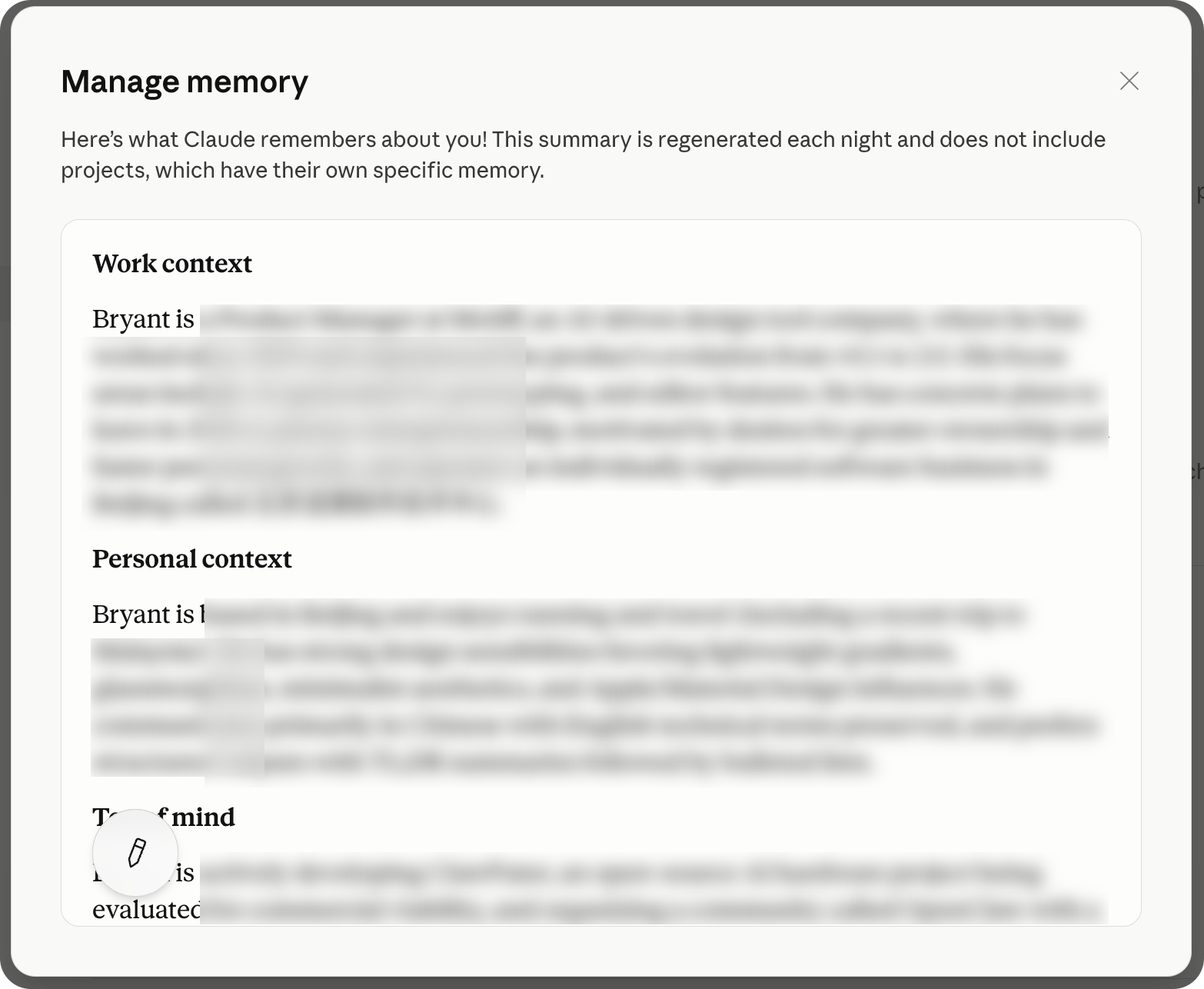
Claude organizes memories into several categories, forming a coherent user profile:
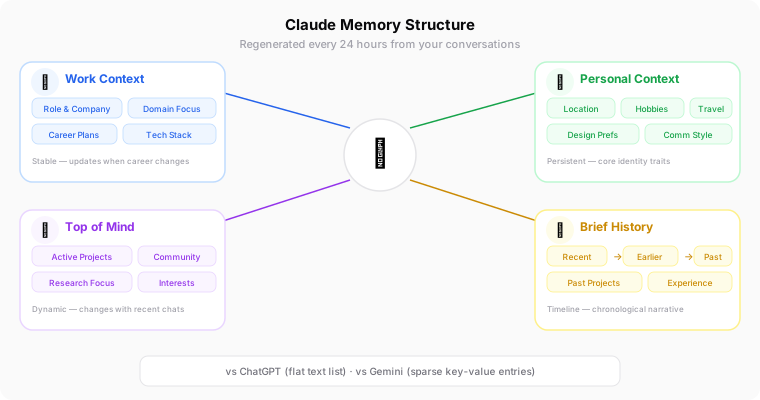
Here's a typical Claude Memory structure example (anonymized):
**Work context**
[Job title] at [Company], focusing on [domain]. [Career goals].

**Personal context**
Based in [City]. [Hobbies]. [Design preferences]. [Communication style].

**Top of mind**
[Current project]. [Community activities]. [Areas of focus].

**Brief history**
*Recent*: [Recent research], [technical practices], [open source contributions].
*Earlier*: [Past project experience], [research topics].
*Long-term*: [Long-term interests].
This narrative structure is far superior to ChatGPT's scattered entries. It doesn't just remember isolated facts — it builds a layered, timeline-aware user profile. From work background to personal preferences, from current focus areas to historical context, everything is clearly organized.
Claude's Cross-Platform Memory Import
Claude supports importing memories from ChatGPT and other AI platforms, giving it a significant advantage over ChatGPT.
The import process is clever: first, use a specific prompt in ChatGPT to export all memories, then paste the exported content into a Claude conversation — Claude will automatically absorb this information.
Here's the prompt for exporting memories from ChatGPT (from Anthropic's docs):
Export all of my stored memories and any context you've learned about me
from past conversations. Preserve my words verbatim where possible,
especially for instructions and preferences.

## Categories (output in this order):

1. **Instructions**: Rules I've explicitly asked you to follow going
   forward — tone, format, style, "always do X", "never do Y", and
   corrections to your behavior. Only include rules from stored memories,
   not from conversations.

2. **Identity**: Name, age, location, education, family, relationships,
   languages, and personal interests.

3. **Career**: Current and past roles, companies, and general skill areas.

4. **Projects**: Projects I meaningfully built or committed to. Ideally
   ONE entry per project. Include what it does, current status, and any
   key decisions. Use the project name or a short descriptor as the first
   words of the entry.

5. **Preferences**: Opinions, tastes, and working-style preferences that
   apply broadly.

## Format:

Use section headers for each category. Within each category, list one
entry per line, sorted by oldest date first. Format each line as:

[YYYY-MM-DD] - Entry content here.

If no date is known, use [unknown] instead.

## Output:
- Wrap the entire export in a single code block for easy copying.
- After the code block, state whether this is the complete set or if
  more remain.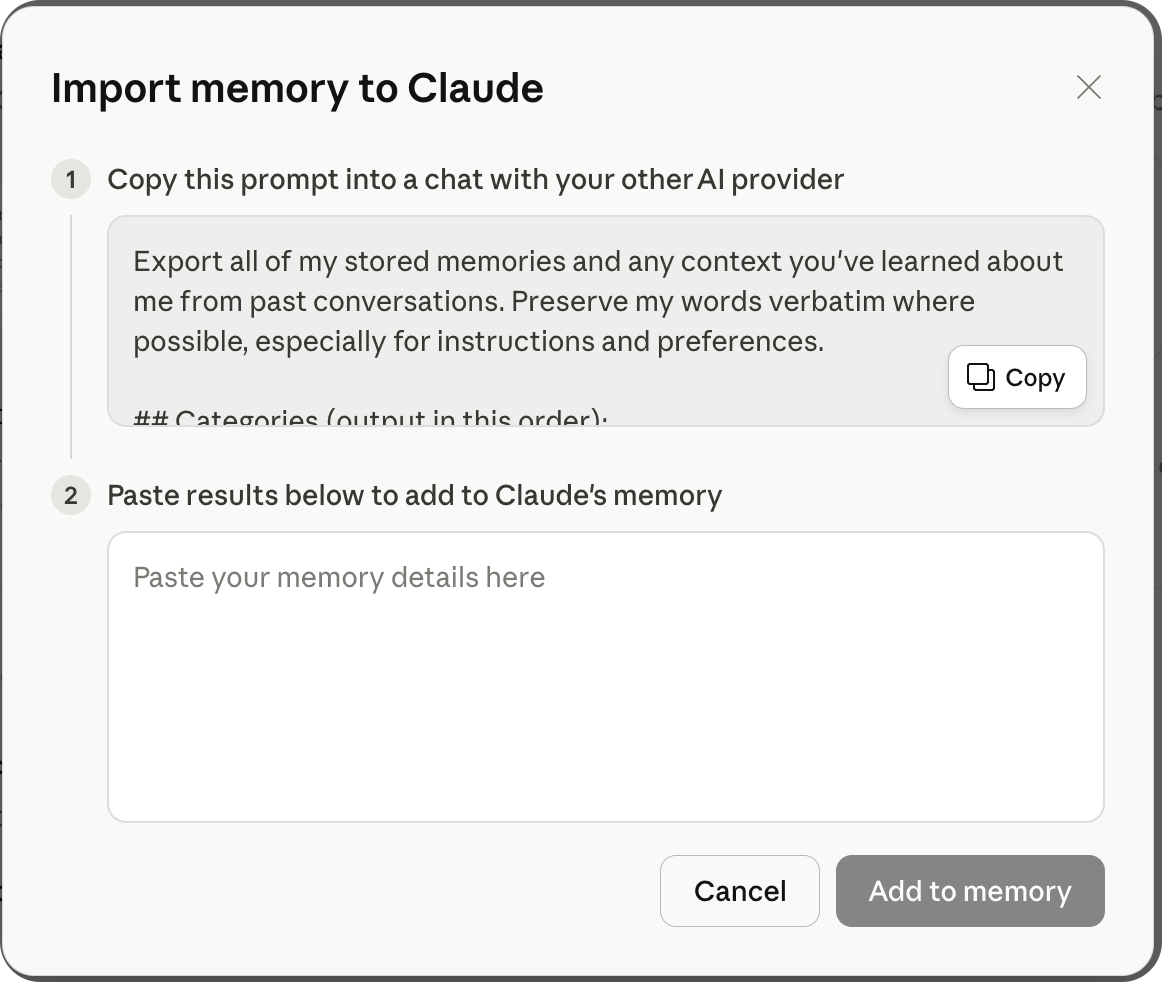
Paste the ChatGPT export into a new Claude conversation, and Claude will automatically absorb this information into its AI memory.
However, there's an important limitation: the imported result is typically a set of condensed fact entries — the rich context from original conversations is lost. What you're transferring is the "conclusions," not the "process" that produced them.
Claude Memory: Key Limitations
- No manual memory addition — You can't say "remember xxx" to directly write to AI memory
- Limited memory capacity — Fills up faster compared to ChatGPT
- Import only transfers summaries — Full conversation context cannot be migrated
- Memory also locked inside Claude — Supports import but not export to other AI platforms
- Conservative auto-extraction — Important information sometimes isn't automatically captured
Gemini Memory: AI Memory & Personal Context Storage
Gemini's AI memory feature is called "Memory" (formerly "Saved Info" / "Personal Context") and is the latest to launch among the three. Currently prioritized for Google AI plan users, gradually rolling out to all users.
Related docs:
How Gemini Extracts Memories
Gemini's AI memory extraction is automatic, learning your preferences and personal context from past conversations. Per official docs, prerequisites include: age 18+, signed in with a personal Google account, and Keep Activity enabled. You can also correct Gemini directly in your chat.
The Memory toggle is in Settings → Personal Intelligence → Memory.
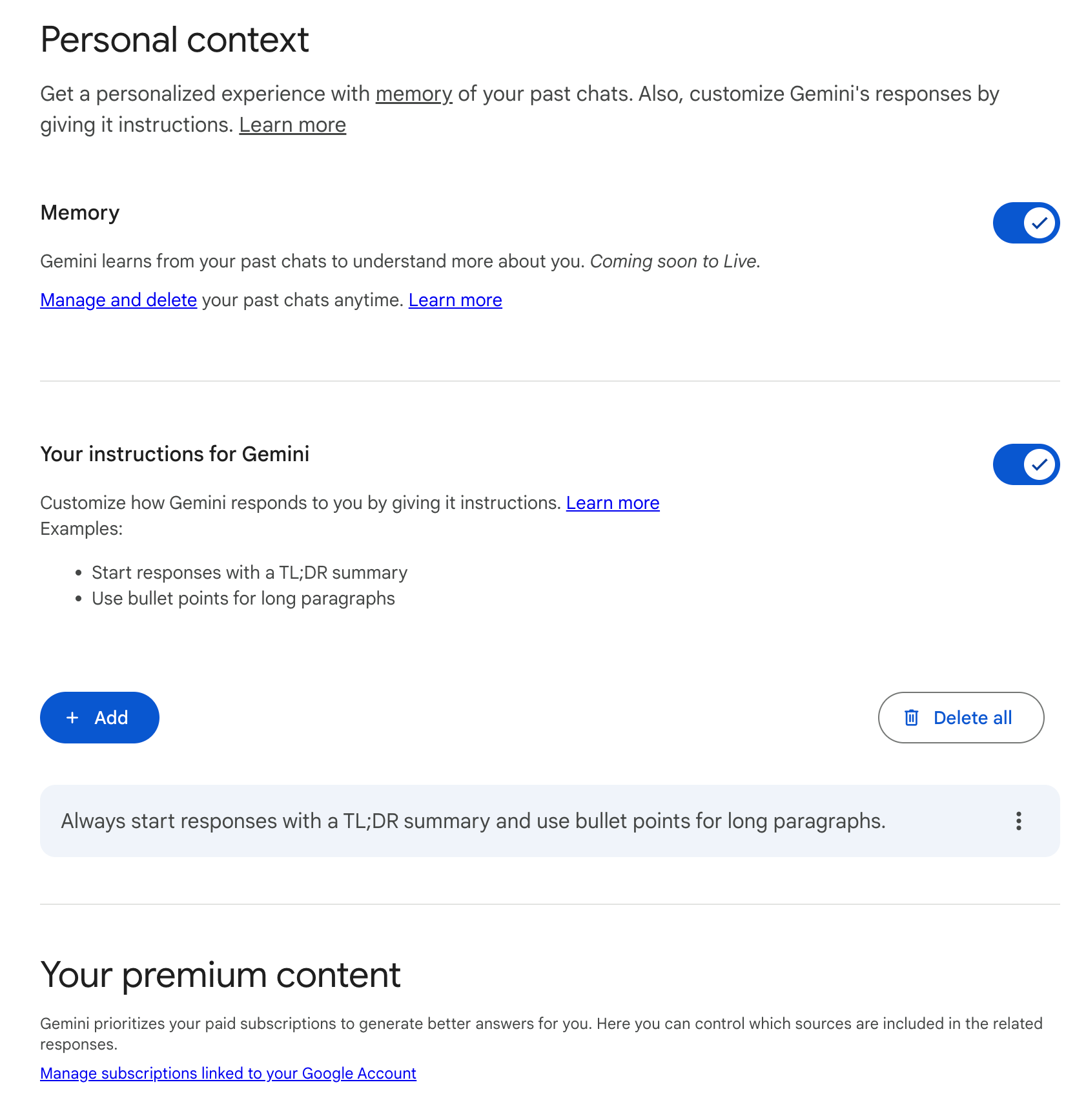
Among the three platforms, Gemini's auto-extraction accuracy is the lowest. My experience is that it frequently misses important information or extracts content that isn't precise enough. This likely reflects Gemini Memory's later launch and early-stage status.
How Gemini References Past Conversations
Gemini supports context understanding based on past conversations. You can ask "Did you use any info from past chats?" to confirm whether it referenced history. But among the three, this is the most basic — its past conversation recall isn't as precise as Claude's Chat Search or as comprehensive as ChatGPT's Reference Chats.
Note: Memory currently doesn't apply to Gems and Live conversations. However, in text chats, you can ask Gemini to reference previous Gemini Live conversations.
How Gemini Memory is Presented
Gemini's AI memory is managed centrally at gemini.google.com/saved-info. It's presented as brief key information entries — more concise than ChatGPT's entries but also lacking more context.
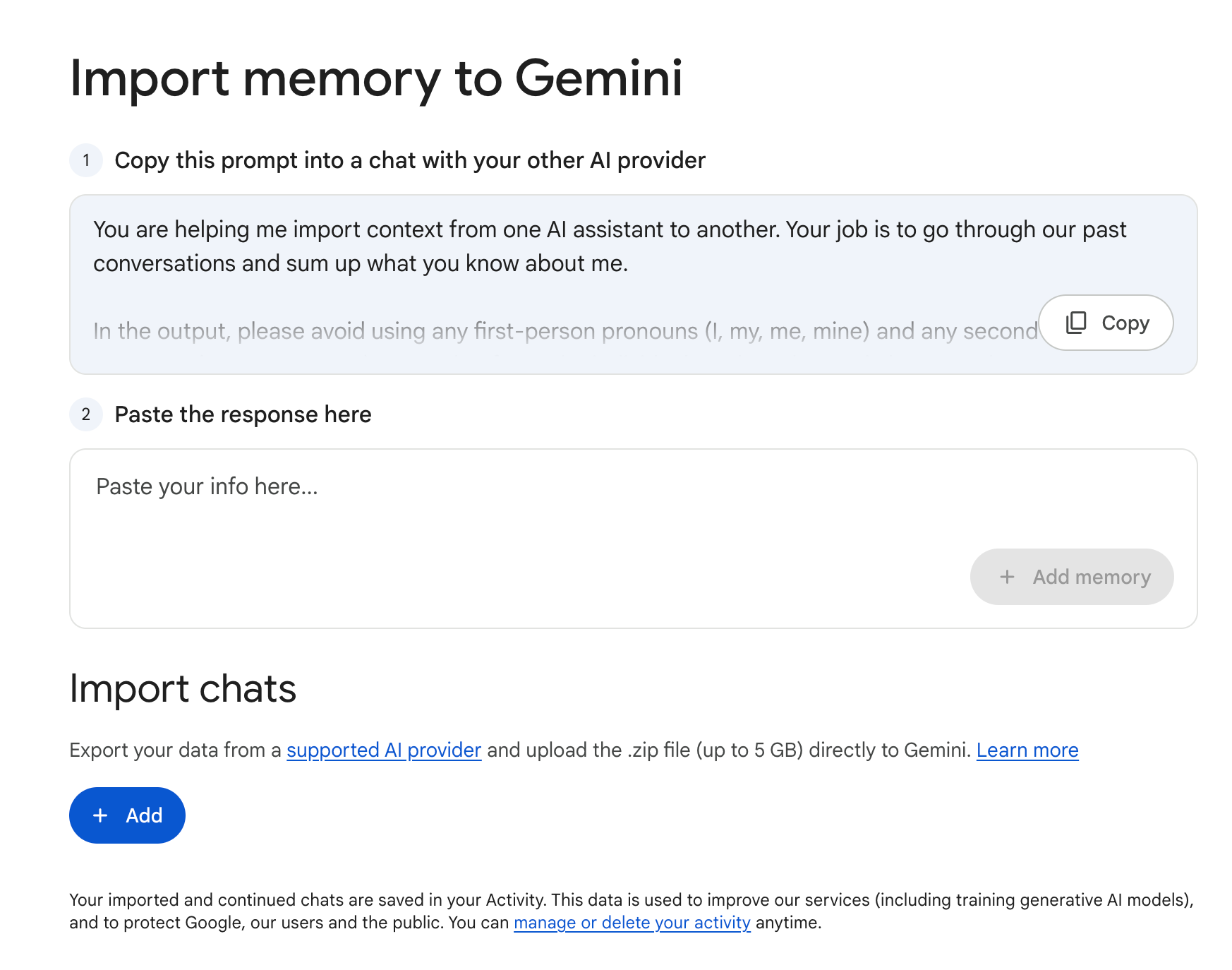
Compared to Claude's structured narrative, Gemini's memory appears fragmented. You see isolated data points with no visible relationships or hierarchy.
Gemini's Cross-Platform Memory Import
Gemini also supports importing memories from other AI platforms, and Google provides an official list of supported platforms.
Here's Gemini's recommended export prompt (for exporting AI memory from the source platform):
You are helping me import context from one AI assistant to another.
Your job is to go through our past conversations and sum up what you
know about me.

In the output, please avoid using any first-person pronouns
(I, my, me, mine) and any second-person pronouns (you, your, yours).
Instead, refer to the individual you have learned about as "the user"
or use neutral phrasing.

Preserve the user's words verbatim where possible, especially for
instructions and preferences.

Categories (output in this order):
1. Demographics Information: Preferred names, profession, education,
   and general residence.
2. Interests & Preferences: Sustained, active engagements (not just
   owning an object or a one-time purchase).
3. Relationships: Confirmed, sustained relationships.
4. Dated Events, Projects & Plans: A log of significant, recent
   activities.
5. Instructions: Rules I've explicitly asked you to follow going
   forward, "always do X", "never do Y", and corrections to your
   behavior. Only include rules from stored memories, not from
   conversations.

Format:
Divide the content into the labeled section using the categories above.
Try to include verbatim quotes from my prompts that justify each entry.
Structure each entry using this format:
The user's name is <name>.
- Evidence: User said "call me <name>". Date: [YYYY-MM-DD].

Output:
- Format the final output summary as a text block.
Per official docs, Gemini offers two import methods — the most complete cross-platform memory import solution among the three:
1. Memory Import:
- Access via Settings → Import memory to Gemini
- Gemini provides a prompt that you copy to another AI platform's conversation
- After the other platform generates a memory summary, paste it back into Gemini and click "Add memory"
- After import, Gemini creates a new conversation thread to integrate these memories
2. Chat History Import:
- You can directly upload ZIP chat history files exported from other AI platforms (5GB file limit, up to 5 ZIPs per day)
- This is the only platform among the three that supports full chat history import to save AI conversations
- Official docs detail the steps for exporting ZIPs from ChatGPT and Claude
- Imported conversations appear in the chat list with an import icon
- Re-uploading the same ZIP overwrites previously imported conversations
Chat History Import is an interesting differentiator — in theory it preserves more complete AI context. But note: the official statement reads "Your imported and continued chats are saved in your Activity. This data is used to improve our services (including training generative AI models)" — imported chat data is used for model training.
Regional restrictions: Gemini Memory is currently unavailable in the European Economic Area (EEA), Switzerland, and the UK.
Gemini Memory: Key Limitations
- Lowest AI memory transparency — Hard to see what it actually remembered and why
- Auto-extraction accuracy needs improvement — Google acknowledges "it might not always get it right"
- Deleting memories is cumbersome — To correct Gemini's understanding, you need to delete related conversations in Gemini Apps Activity; if Connected Apps data is involved, you also need to disconnect
- Doesn't apply to Gems and Live — AI memory feature has limited scope
- Imported data used for training — Chat History Import data is used to improve services including model training — privacy-conscious users take note
- Regional restrictions — Unavailable in the EEA, Switzerland, and the UK
Common Problems Across All Three AI Memory Platforms
After analyzing the AI memory features of all three platforms, I've identified several shared structural issues:
1. AI Memory is Locked Inside Each Platform
This is the most fundamental problem. ChatGPT memories can't transfer to Claude, and Claude memories can't transfer to Gemini. Even though Claude and Gemini support "importing," it's just a one-time text transfer — what gets moved over are summaries, not full context, and after import the two sides evolve independently.
If you're like me, switching between three AI platforms daily, memories keep forking. The same project's background information exists in three different versions across three platforms — and the versions don't match.
2. Only Summaries, No Complete AI Conversation Context
All three platforms save summaries extracted from conversations — condensed fact entries or user profiles. What about the original conversation records? Either not saved, or saved but not used for memory recall.
But full AI context is often more valuable than conclusions. The fact "user chose option A" is less useful than "user deliberated between options A and B for a long time and ultimately chose A because of xyz" — the complete process.
3. Users Lack Control Over AI Memory Management
All three provide "view and delete memories" functionality, but that's bare-minimum memory management. You can't precisely tell the AI "use this memory in this scenario," can't set memory priorities, and can't configure different memory sets for different conversation types.
Memory recall is entirely platform-controlled. You're a passive recipient.
4. This is a Structural Problem, Not a Feature Gap
These limitations aren't about any single platform doing a poor job — every platform has commercial incentives to lock your data and attention inside its own ecosystem. Open cross-platform memory doesn't serve the platform's interests. So this problem is unlikely to be solved by the platforms themselves.
A Different Approach: Cross-Platform AI Memory with MemoryX
Understanding how all three platforms handle AI memory makes MemoryX's design philosophy clear — it's not competing with the platforms, but building a shared cross-platform memory layer between them.
MemoryX is an independent Chrome extension that sits on top of ChatGPT, Claude, and Gemini, providing unified AI memory management.
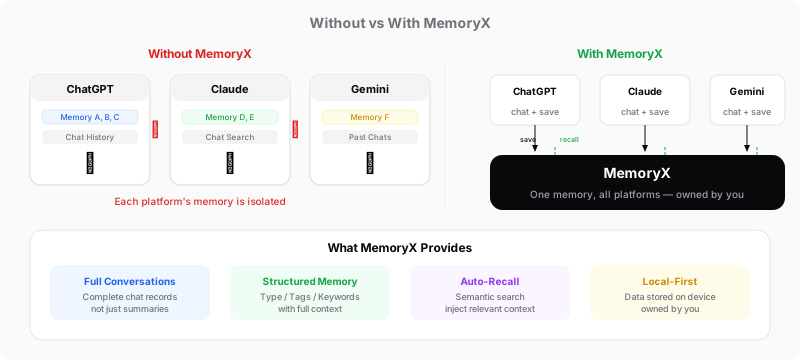
AI Memory Comparison Across Every Dimension
| Dimension | ChatGPT | Claude | Gemini | MemoryX |
|---|---|---|---|---|
| Memory extraction | Auto + manual | Auto (24h synthesis) | Auto | Auto-extract + manual edit |
| Past conversation reference | Reference Chat History | Chat Search (RAG) | Past Chats | Full conversation archive + semantic search |
| Memory display | Plain text entries | Structured categories | Brief entries | Category tags + full context |
| Cross-platform | Not supported | Import supported | Import supported | Native cross-platform (same memories) |
| Data ownership | Belongs to OpenAI | Belongs to Anthropic | Belongs to Google | Belongs to you (local storage) |
| Memory transparency | Medium | Medium | Low | High (every entry viewable, editable) |
| What's saved | Extracted summaries | Extracted summaries | Extracted summaries | Full conversations + structured memories |
| Recall method | Platform-controlled | Platform-controlled | Platform-controlled | Transparent and controllable |
MemoryX's Core Cross-Platform AI Memory Difference
Cross-platform means "sharing," not "importing." Platform import is a one-time transfer — after the move, both sides go their separate ways. MemoryX maintains one set of AI memories that simultaneously serves all platforms — something you discussed in Claude is automatically recalled the next time you ask a question in ChatGPT.
It saves complete AI conversations, not just summaries. The three platforms only save extracted summary entries, losing the rich context of original conversations. MemoryX saves complete conversation records and extracts structured memories on top of them — both participate in recall.
Memory management is transparent to users. Platform built-in memory recall is a black box — you don't know which memories informed the answer. MemoryX explicitly shows which AI memories are injected, and you can review and adjust them at any time.
Your data belongs to you. Platform memory data lives on their servers, subject to their data policies. MemoryX stores your personal context data locally — you have full control.
Conclusion: Choosing the Right AI Memory Solution
Each platform's AI memory features have their strengths:
- ChatGPT Memory is most flexible for manual addition and memory management (search, sort, version history), with unlimited Chat History capacity — ideal for users who want precise control over AI memory. But Saved Memories + Chat History require Plus/Pro
- Claude Memory leads in structured organization (4-category narrative memory), with RAG-based Chat Search for the most precise results and smooth cross-platform import. But no manual addition, and auto-extraction is conservative
- Gemini Memory is the only platform supporting ZIP chat history import, with the most complete cross-platform import options. But its AI memory features are overall the thinnest, and imported data is used for model training
But if you're like me — switching between ChatGPT, Claude, and Gemini every day — no single platform's memory features are enough. What you need is your own AI memory layer — independent of any platform, working across tools, with your personal context data in your own hands.
That's what MemoryX is building.
Try MemoryX — your AI context, across every tool.
Feedback or suggestions? Join our Discord community.
Ready to try MemoryX?
Stop repeating yourself across AI tools. Let your context follow you.
Install from Chrome Web Store